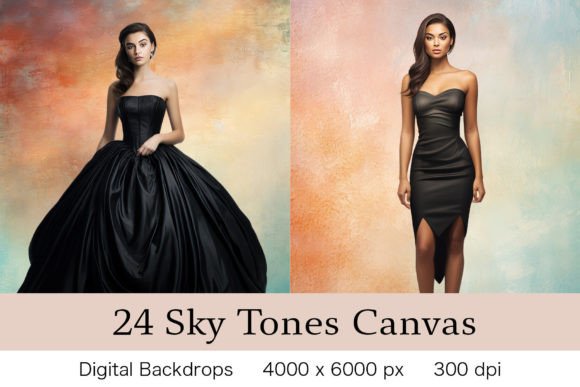
24 Sky Tone Canvas Backgrounds: Your Go-To for Dreamy Design
Every designer, marketer, and content creator hits a wall sometimes. You have the perfect model, the ideal layout, and a clear message, but the backdrop feels flat. It lacks that certain depth or mood that makes an image truly resonate. This is where a versatile, high-quality set of digital backdrops becomes an essential part of your toolkit. The 24 Sky Tone Canvas Backgrounds bundle is exactly that—a collection designed to infuse your projects with atmospheric depth and a soft, professional aesthetic.
Let’s get practical about what this asset offers. You’re getting 24 individual PNG files, each a massive 6000 x 9000 pixels at 300 DPI. That resolution is critical. It means these aren’t just for social media posts. They’re built for high-end print projects, large-format designs, and detailed digital work where clarity is non-negotiable. The sky tone palette is intentionally muted and versatile, ranging from soft dawn hues to hazy afternoon tones. This isn’t about dramatic, overpowering sunsets; it’s about creating a consistent, elegant canvas that lets your subject—be it a product, a person, or typography—take center stage.
More Than Just a Pretty Picture: The Strategic Use of Sky Tones
Understanding how to leverage these backgrounds effectively separates good design from great design. The sky tone aesthetic carries a specific personality: it’s calm, expansive, and subtly emotional. This makes it a powerful tool for influencing brand perception and audience engagement. A soft, gradient sky behind a product shot can suggest clarity, openness, and aspiration. Used as a backdrop for portrait photography, it adds a layer of professionalism and artistry without distracting from the subject.
The real-world applications are broad, but here’s where they truly shine:
- E-commerce and Product Photography: For entrepreneurs and small business owners, clean product shots are everything. Placing a handmade candle, a piece of jewelry, or a cosmetic product against one of these 24 Sky Tone Canvas Backgrounds instantly elevates the perceived value. It moves the product out of a sterile studio environment and into a mood-driven scene.
- Social Media Graphics and Marketing: Consistency is key for brand recognition. Using a cohesive set of backgrounds from this bundle across your Instagram grid, Facebook ads, or Pinterest pins creates a unified visual language. It makes your content immediately identifiable as yours, strengthening your brand identity without a single word.
- Editorial and Web Design: For bloggers and publishers, these backgrounds serve as excellent hero image backdrops or section dividers. They add visual interest and break up text-heavy layouts, improving readability and guiding the reader’s eye through the content hierarchy of your page.
- Logo and Branding Mockups: Need to present a logo design to a client? Showcasing it on a textured, atmospheric canvas instead of a plain white background provides context and helps the client visualize the logo in a real-world application. It’s a subtle touch that demonstrates design thoughtfulness.
A Practical Guide to Integration and Technique
Simply dragging and dropping an image onto a background won’t yield professional results. The bundle’s note about needing knowledge of using Layers and Masking in Adobe Photoshop is the most important practical detail. This is where you transform a static backdrop into a seamless part of your composition.
Here’s a streamlined approach to get the most out of these assets:
- Layer Management is Everything: Open your subject image and one of the sky backgrounds in Photoshop. Place the background layer beneath your subject. Use the Quick Selection Tool, Select Subject, or the Pen Tool to create a precise selection of your subject. This is the foundational step for a clean cutout.
- Refine with Layer Masks: Instead of deleting the background, add a Layer Mask to your subject layer. Use a soft black brush on the mask to gently blend the edges, especially around hair or intricate details. This non-destructive method allows for endless adjustments.
- Color and Tone Harmony: The magic often happens in the post-processing. Your subject and the new background will likely have different color casts. Use Adjustment Layers like Curves, Color Balance, and Hue/Saturation (clipped to your subject layer) to match the lighting and color temperature. A subtle Gradient Map set to Soft Light can also unify the tones beautifully.
- Adding Atmosphere: To sell the composite, add a final touch. Create a new layer above everything, fill it with a color sampled from the background, set the layer blend mode to Soft Light or Color, and lower the opacity significantly. This “atmosphere layer” glues the elements together, making the final image feel cohesive and intentional.
Evaluating project fit is straightforward. If your brand or project requires a touch of serenity, sophistication, or a natural, airy feel, this collection is a strong candidate. It’s less suited for projects demanding gritty, urban, or highly saturated energy. Before committing to a full project, test a few backgrounds from the set. How does your specific color palette interact with the sky tones? Does the texture of the canvas complement or compete with your design elements?
For designers, this bundle is more than just a set of digital backdrops; it’s a design asset that solves a common problem. It provides a consistent, high-resolution starting point for a wide range of creative and commercial projects, from crafting a cohesive social media campaign to designing elegant packaging mockups. By mastering the technical process of compositing, you unlock its full potential to enhance readability, establish visual hierarchy, and ultimately, create more engaging and professional work.