Creepy Scenes Halloween Backgrounds: Elevate Your Spooky Photography
Transform Your Photos Instantly with Digital Backdrops
When Halloween approaches, the pressure to create standout, atmospheric photos can feel overwhelming. Between scouting locations, building sets, and managing physical props, the creative process often gets bogged down by logistics. This is where Creepy Scenes Halloween Backgrounds offer a practical, powerful solution for photographers and creators. These high-quality digital backdrops allow you to save valuable time, money, and storage space by replacing cumbersome physical setups with versatile, layered assets. Instead of spending hours constructing a haunted vignette, you can achieve a professional, eerie atmosphere directly in your editing software, focusing your energy on capturing the perfect subject expression rather than the background logistics.
Digital backdrops are not just for seasoned professionals; they are a game-changer for hobbyists, small business owners, and content creators alike. The key lies in understanding how to use them effectively. These assets are designed for any photo editing program that supports layers, making them incredibly adaptable. Whether you are a designer working in Adobe Photoshop, a blogger using PicMonkey, or a crafter utilizing GIMP, the workflow remains intuitive. The goal is composite photography—merging your subject with a new environment seamlessly. By planning your compositions beforehand and considering the directional lighting inherent in the digital backdrop design, you can create images that look as if they were shot on location in a haunted mansion or a misty graveyard.
The Power of Atmosphere: Visual Style and Appeal
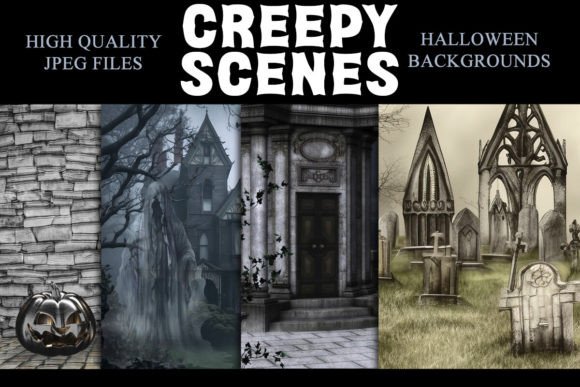
The visual personality of Creepy Scenes Halloween Backgrounds is distinct and carefully crafted. These are not generic, flat images; they are designed to evoke a specific mood—gothic, mysterious, and spine-tingling. The appeal lies in their high-resolution detail. With a backdrop size of 8" x 10" (3000 × 2400 px) and a crisp 300dpi quality, every shadow, texture, and architectural element is rendered with clarity. This level of detail is crucial for maintaining a professional standard in your final output, whether it is for print or digital display.
What sets these backdrops apart is their versatility in application. They function as a foundational design asset that can influence the entire visual hierarchy of your project. For instance, a backdrop featuring a dimly lit, cobwebbed library creates a narrative context that changes how a viewer perceives the subject placed within it. This is a core principle of composite photography—the background is not just a filler; it is an active participant in the storytelling. The style leans into classic Halloween tropes with a modern execution, making it suitable for a wide range of projects. From spooky social media graphics to festive marketing materials, these backgrounds provide a consistent, high-quality aesthetic that elevates the overall brand identity of your seasonal content.
Practical Applications for Designers and Creators
Understanding where and how to deploy Creepy Scenes Halloween Backgrounds can significantly enhance your creative output. For professional photographers, these assets are a time-saving powerhouse during the busy fall season. Imagine offering mini-sessions without the need for a physical set. By using these backdrops, you can offer a variety of spooky scenes—from haunted forests to Victorian parlors—in a single session, simply by swapping out the background in post-production. This not only maximizes your shooting efficiency but also expands your creative portfolio without additional prop costs.
For marketers and entrepreneurs, these backgrounds are invaluable for seasonal campaigns. Creating eye-catching social media graphics or email headers becomes a streamlined process. A compelling Halloween-themed image can stop the scroll and increase engagement. Because these are JPEG files, they are easy to store and integrate into your existing workflow. They are compatible with a vast array of software, including Adobe Photoshop, Photoshop Elements, Lightroom (with the ON1 plugin), Paint Shop Pro, and more. This broad compatibility ensures that regardless of your preferred editing tool, you can utilize these assets effectively.
Mastering the Composite: A Guide to Realistic Results
Achieving a believable composite image requires more than just placing a subject onto a new background. It demands attention to detail, particularly regarding lighting and color grading. When working with Creepy Scenes Halloween Backgrounds, the first step is to analyze the light source in the backdrop. Is the light coming from the left, suggesting a flickering candle? Or is it a diffused, overcast glow from above? Your subject must be lit in a way that matches this directionality. This might involve using a reflector or a secondary light source during your photoshoot to mimic the shadows and highlights present in the digital scene.
Color consistency is equally important. The mood of a Halloween scene is often defined by its color palette—deep purples, muted greens, and stark oranges. When compositing, you will likely need to adjust the color balance and saturation of your subject to blend seamlessly with the backdrop. Tools like adjustment layers and masks are your best friends here. Remember, the goal is to create a cohesive visual hierarchy where the subject and background exist in the same visual space. Paying attention to these details transforms a simple overlay into a professional-grade piece of editorial design or packaging design.
Choosing the Right Backdrop for Your Project
With various Creepy Scenes Halloween Backgrounds available, selecting the right one for your project involves a few key considerations. First, consider the narrative you want to tell. Are you creating a playful, family-friendly image, or a more intense, horror-inspired piece? The style of the backdrop should align with the tone of your content. For instance, a backdrop with a whimsical pumpkin patch might be perfect for a children’s portrait, while a decrepit asylum hallway suits a more mature, thriller-themed project.
Evaluating the technical fit is also crucial. Always review the included styles and specifications. The 3000 × 2400 px size at 300dpi is ideal for most print applications, including posters, flyers, and high-quality photo prints. For digital use, this resolution provides ample room for cropping and resizing without losing quality. When testing font pairings for any overlaid text—be it for a social media post or a flyer—ensure the typography complements the background’s mood. A display font with a serif structure might evoke a classic, gothic feel, while a clean sans serif can provide modern contrast. Always test readability against the backdrop’s textures and colors to ensure your message is clear.
Maximizing Your Investment in Digital Assets
Investing in high-quality digital backdrops like Creepy Scenes Halloween Backgrounds is a strategic move for any creative professional or enthusiast. They represent a reusable, scalable asset that can be adapted across multiple projects year after year. Unlike physical props that degrade or require storage space, digital files remain pristine and take up only virtual space. This makes them an economical choice for those looking to build a robust library of design assets.
Furthermore, the ease of use lowers the barrier to entry for complex photo manipulation. You do not need to be a master of modern typography or advanced compositing to achieve great results. The backdrops provide a strong foundation upon which you can build. By focusing on the core principles of lighting, color, and composition, you can leverage these assets to produce professional work that enhances your brand identity, engages your audience, and saves you significant time and resources. Whether for personal enjoyment or commercial gain, these digital tools empower you to bring your spookiest visions to life with confidence and efficiency.