Transform Your Halloween Photos with Digital Backdrops
Creating stunning, professional-looking Halloween portraits used to require a dedicated studio space, expensive physical props, and hours of setup and teardown. For photographers, content creators, and small business owners, that investment in time, money, and storage can be prohibitive. Enter the game-changer: Halloween Scenes Backgrounds and High-quality Digital Backdrops. These are not just simple images; they are complete, pre-designed environments ready to be integrated into your workflow, saving you significant resources while unlocking a new level of creative possibility.
What Exactly Are Digital Backdrops?
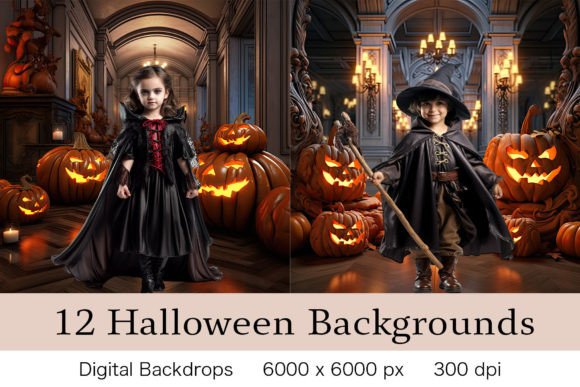
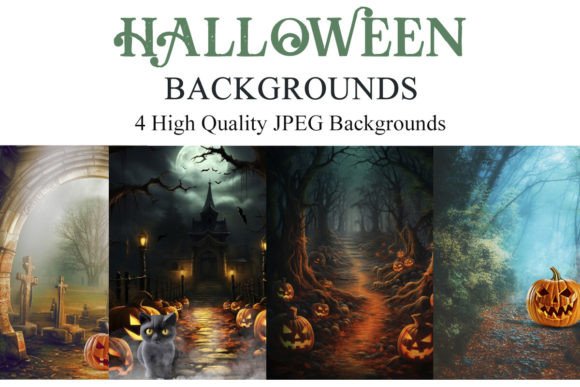
Think of a digital backdrop as a layered scene file. Instead of a flat picture, it's a high-resolution JPEG image designed to serve as the background layer in your photo editing software. You then place your subject—a person, a pet, a product—on a new layer above it, and use masking tools to seamlessly blend the two. The result is a composite photograph that looks like it was taken in a haunted mansion, a moonlit graveyard, or a spooky forest, all without leaving your studio. The appeal lies in their incredible versatility and the polished, professional font—or rather, visual style—they lend to any project. They provide a consistent, high-quality aesthetic that's difficult to achieve with makeshift physical setups.
The practical benefits are immediate. You eliminate the need for prop storage, which is a major advantage for home-based studios or mobile photographers. Setup time is reduced from hours to minutes. The financial outlay is a one-time purchase versus the recurring cost of renting space or buying new physical decorations each season. For a small business creating seasonal marketing materials, this efficiency is invaluable.
Unlocking Creative Potential for Every Project
The true power of Halloween Scenes Backgrounds is their compatibility and application across a wide spectrum of creative fields. These are essential design assets for anyone working in visual media.
For Professional Photographers: Offer unique, themed mini-sessions without the logistical nightmare. Create a portfolio of diverse Halloween looks, from elegant gothic to playful cartoonish, all with consistent lighting and quality. The backdrops work perfectly in Adobe Photoshop, Lightroom (with the ON1 plugin), and Paint Shop Pro, fitting seamlessly into established professional workflows.
For Digital Marketers & Brand Strategists: Elevate your seasonal campaigns. Create engaging social media graphics, blog post headers, email newsletter visuals, and website banners that capture the Halloween spirit. A cohesive visual theme, built using these backdrops, strengthens brand identity and audience recognition during a key shopping period.
For Content Creators & Bloggers: Stand out with professional-looking thumbnails, YouTube video backgrounds, and article imagery. A well-composed photo using a digital backdrop conveys a higher level of effort and quality, which builds trust and engagement with your audience.
For Crafters & Hobbyists: Design custom invitations, party decorations, greeting cards, or digital scrapbook pages. The high-quality 300dpi, 8x10 inch files ensure your printed projects look crisp and vibrant. Software like GIMP or PicMonkey makes the process accessible even for those new to photo editing.
Practical Guidance for Flawless Composites
Getting the best results from digital backdrops is less about technical wizardry and more about thoughtful planning and execution. Here’s how to approach it like a pro.
Plan Your Composition First: Before you even open your editing software, have a clear vision. What is the mood? Where will the subject be placed in the scene? Consider the rule of thirds and the visual flow of the backdrop. Is the light source coming from the left? Then your subject's lighting should match.
Master Directional Lighting: This is the most critical step for realism. Study the digital backdrop. Identify the primary light source (e.g., a glowing window, a lantern, moonlight). When photographing your subject, light them to match that direction and quality of light. A soft, diffused light from the left in the backdrop means your key light should also be soft and from the left. This consistency sells the illusion.
Choose the Right Software: While these files are JPEGs, you need a program that supports layers and masking. For maximum control, Adobe Photoshop or Photoshop Elements are industry standards. For a more affordable yet powerful option, Affinity Photo or the free GIMP are excellent. Mobile apps like PicsArt or Superimpose can also work for simpler edits on the go.
Evaluate Fit and Style: Not every backdrop suits every project. A whimsical cartoon haunted house won't fit a serious, gothic brand. Review the visual characteristics—color palette, level of detail, overall mood—and ensure it aligns with your project's goals and your existing brand identity. The personality of the backdrop should complement, not clash with, your subject.
Test and Refine: Don't be afraid to experiment. Try different subjects, adjust the color grading of the entire composite to unify the layers, and play with blending modes for creative effects. The goal is to make the final image look intentional and cohesive, as if it were always one piece.
In essence, Halloween Scenes Backgrounds are more than just a seasonal novelty. They are a powerful, efficient tool for modern visual creation, enabling everyone from solo entrepreneurs to established studios to produce captivating, professional content that engages audiences and elevates projects. By understanding their application and mastering a few key techniques, you can transform your creative output and save your most valuable resources: time, money, and space.