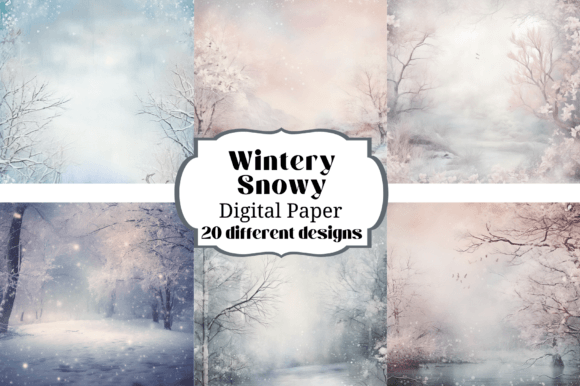
Embrace the Chill: Unlocking Creativity with Wintery Snowy Digital Paper Backgrounds
There is a specific kind of magic in the way fresh snow blankets a landscape—covering the jagged edges of the world in soft, uninterrupted white. As designers and creators, we often try to capture that atmospheric silence in our projects. This is where Wintery Snowy Digital Paper Backgrounds come into play. They are not just textures; they are mood-setters. When you open a file featuring these backgrounds, you aren't just seeing a white sheet; you are looking at high-resolution compositions that mimic the delicate, crystalline structure of frost and snow.
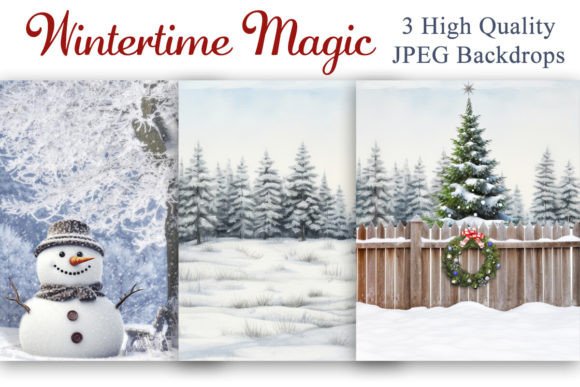
The visual personality of these backgrounds is defined by their subtlety. Unlike bold, overpowering patterns, wintery digital papers rely on nuance. They often feature soft gradients, realistic snowflake overlays, or that classic "glitter" effect that catches the light without blinding the eye. The "personality" is cool, calm, and elegant. It evokes feelings of nostalgia, warmth (ironically), and celebration. Whether it is a seamless pattern of falling snow or a textured paper that looks like handmade cotton rag, the style is versatile enough to support a brand identity that values sophistication and clarity.
The Anatomy of a Premium Texture: Quality and Utility
When sourcing design assets, quality is non-negotiable. One of the defining characteristics of this collection is the technical specification: high-resolution PNG files at 300 DPI. In the world of print design, 300 DPI (dots per inch) is the gold standard. It ensures that when you scale these textures for a large packaging design or a full-page magazine spread, the image remains crisp. You won't see the pixelation that often plagues lower-quality freebies found on the web.
Because these are provided as separate PNG files, they offer immense flexibility. You can layer them behind typography in editorial design, use them as a clipping mask in Photoshop, or import them directly into Procreate for digital illustration. The fact that they are watermark-free and clearly labeled is a practical blessing for anyone managing large asset libraries. It removes the friction from the creative process, allowing you to focus on visual hierarchy rather than file management.
Strategic Applications: Beyond Scrapbooking
While these are perfect for personal memory keeping, their utility extends far into commercial and professional realms. As a graphic designer or brand strategist, you can use wintery textures to create seasonal marketing campaigns that feel cohesive and professional.
Web Design and Digital Presence
In web design, background textures play a crucial role in readability and user experience. A flat white background can sometimes feel sterile or cause eye strain on bright monitors. A subtle snowy digital paper adds depth without compromising the legibility of body text. It can soften the harshness of a sans serif font used for headers, creating a beautiful contrast between the organic texture of the snow and the geometric precision of modern typography. For e-commerce sites during the holiday season, these backgrounds can instantly signal to the visitor that they have entered a festive, curated space.
Logo Design and Brand Identity
When working on logo design for winter-themed events, ski resorts, or holiday pop-up shops, texture is your best friend. Instead of a flat vector background, placing a logo over a wintery paper can give it immediate context. It helps in presenting the logo to clients in a "mockup" style that looks realistic and polished. Furthermore, maintaining brand consistency across social media is easier when you have a library of matching textures. You can use these papers for Instagram story backgrounds, Pinterest pins, and Facebook headers to ensure your visual identity remains recognizable.
Publishing and Editorial Layouts
For bloggers and publishers, the challenge is often finding unique visuals that don't look like stock photos. These digital papers solve that problem. They work exceptionally well as background layers for text-heavy pages. If you are designing a digital newsletter or a printable planner, the snowy texture adds a tactile feel to the screen. It bridges the gap between the digital and the physical world, making the content feel more "premium." Pairing a sophisticated serif font with a soft snow texture can elevate a simple PDF into a high-end digital magazine.
Mastering the Pairing: Typography and Contrast
Using textured backgrounds requires a thoughtful approach to typography to ensure your message isn't lost. The goal is to maintain high contrast and legibility.
- Contrast is Key: Since wintery backgrounds are generally light, you need to use darker typography. Deep blues, charcoals, or even rich burgundies work beautifully against the cool white of the snow. Avoid light grey or pastel text, as it will fade into the background and frustrate your readers.
- Choosing the Typeface: Because snowy textures are often soft and irregular, they pair best with cleaner typefaces. A bold sans serif font can cut through the texture for headlines, providing a modern, structural anchor. Conversely, a delicate script font or handwritten font can blend with the romantic nature of the snow, but ensure the strokes are thick enough to be legible.
- Creating Hierarchy: Use the background to your advantage in visual hierarchy. You can use a full-opacity snowy paper for the main header area and fade it out to white where the body text begins. This draws the eye upward and keeps the reading experience comfortable.
Practical Evaluation: Is This the Right Asset for You?
Before integrating these assets into your workflow, it is worth evaluating the specific needs of your project. Not every design calls for a textured background, but when it does, the execution must be flawless.
First, consider the commercial licensing. It is vital to understand that while you are purchasing the digital files for use in your end products (like a printed invitation or a website banner), the files themselves cannot be resold as digital downloads. This is standard practice for premium fonts and assets, protecting the original creator while empowering you to build your business.
Second, test the file in your specific software environment. Whether you are using Adobe Illustrator, InDesign, or Canva, import the PNG and check how it renders. Look at the readability of your text overlays. Zoom in to check the resolution. Because these files are high-res, they might be larger than standard web images, so you may need to optimize them for web use to ensure fast loading times, while keeping the original high-res file for print.
Ultimately, Wintery Snowy Digital Paper Backgrounds are more than just seasonal decorations; they are versatile design assets. They provide a foundation for creative fonts to shine and help entrepreneurs and marketers